Medium Format Photography
- Duration: 2 Weeks
- Age limit: No Limit
- Weekend Course
- Pre-requisite: Foundation Photography
- Co-requisite: Fashion Photography / Food and Product Photography
-
 History of Medium Format Photography
How medium format evolved and why it remains useful for quality-focused commercial photographers.
-
 Introduction to Medium Format
Understanding the camera system, workflow, quality difference, and practical applications.
-
 Camera Body and Lenses
Working with the medium format body, lens choices, handling, and camera controls.
-
 Image Resolution
Learning how resolution, detail, and output size affect commercial image production.
-
 RAW and File Formats
Choosing file formats, reading RAW quality, and preparing files for processing.
-
 Sensor Size
Understanding larger sensors, tonal depth, dynamic range, and image character.
-
 File Workflow
Organising capture files, backups, selection, processing, and export for client work.
-
 Tethering
Shooting connected to a laptop so images can be reviewed during production.
-
 Processing
Developing a controlled post-production approach for high-resolution files.
-
 Fashion Photography
Applying medium format quality to fashion lighting, posing, and studio output.
-
 Product Photography
Using detail, sharpness, and controlled light for commercial product images.
-
 Advanced Practice
Bringing capture, lighting, tethering, and processing together in class assignments.
-
-
Course Overview
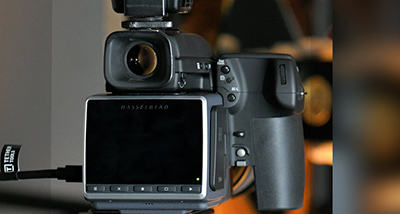
If you are a quality-fixated photographer working for perfection-driven clients or personal projects, medium format photography gives you image quality, depth, and detail that smaller formats cannot always match.
This course introduces students to medium format camera handling, file quality, tethered shooting, software workflow, and practical assignments for fashion and product photography.
-
-
Why Medium Format
Medium format is used when detail, colour, tonal range, and premium output matter. Students learn where the format makes a visible difference and how to use it with purpose.
-
-
Advantages of Medium Format
The course covers resolution, dynamic range, colour depth, larger files, and the discipline required while shooting with a professional medium format setup.
-
-
Sensor Size
Students compare sensor size, field of view, depth, and tonal transitions so they understand what changes when moving into medium format systems.
-
-
File Format
RAW image handling, file formats, naming, storage, backup, and processing decisions are explained as part of the complete professional workflow.
-
-
Tethering
Tethering helps photographers and clients review images immediately. Students learn connection, capture, preview, selection, and production flow.
-
-
Connectivity and Ergonomics
The class covers how to set up the camera, connect devices, manage handling, and work efficiently during studio assignments.
-
-
Lenses
Students learn lens choices for portrait, fashion, product, and studio work, including how each lens affects perspective, sharpness, and working distance.
-
-
Shooting Process
Shooting practice combines setup, exposure, focusing, lighting decisions, tethering, and review so students understand the pace of a professional session.
-
-
Processing Workflow
Processing focuses on developing clean files while protecting detail, tonal range, skin, texture, product finish, and final delivery requirements.
-
-
Fashion Photography
Fashion assignments help students use medium format for model direction, lighting, posing, detail, and editorial-style studio output.
-
-
Product Photography
Product assignments focus on sharpness, reflection control, texture, colour, and premium commercial presentation.
-
-
Phocus Software
Students are introduced to Phocus workflow for capture review, file handling, basic corrections, and output decisions.